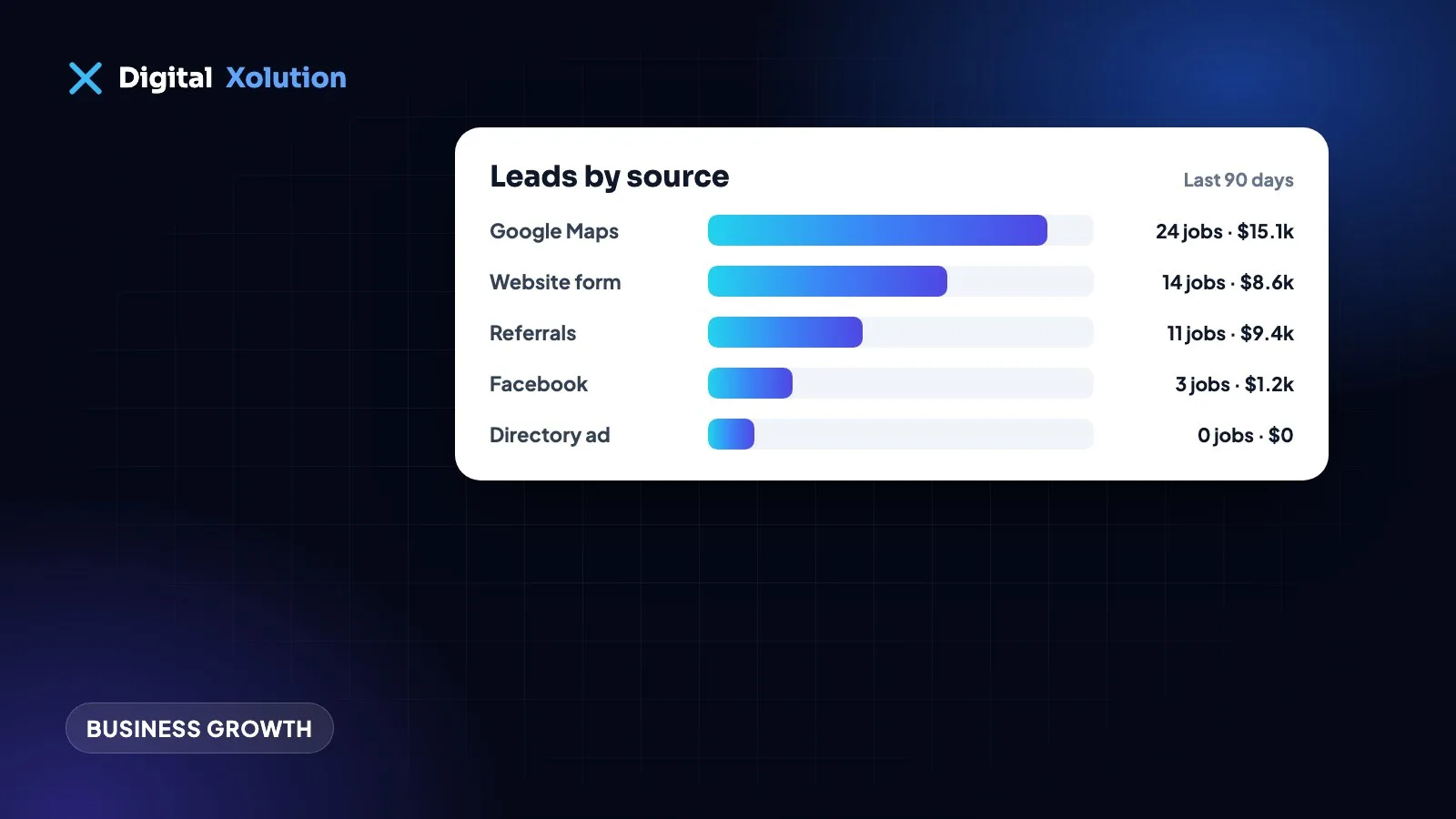
"How did you hear about us?" is the oldest tracking method there is, and most customers answer "Google" or "I don't remember". If you're spending money on a website, ads, directories or SEO, you need a better answer, because otherwise you can't tell which ones bring in work.
You don't need a marketing team or expensive software. Here's a simple setup that works for most local businesses.
What you're trying to learn
For every lead, you want to know three things:
- Where it came from: Google search, Google Maps, an ad, Facebook, a referral, a directory.
- How they got in touch: a phone call, a form, a text, a booking, a walk-in.
- What happened next: did it become a paying job, and how much was it worth?
The third one matters most. A channel that sends 50 enquiries and no jobs is worth less than one that sends five good ones.
Step 1: Set up the free tools
- Google Analytics 4 shows how people reach your website and what they do there. Set up "key events" (what Google used to call goals) for form submissions, phone link clicks and bookings.
- Google Search Console shows which searches your site appears for and which pages they land on.
- Google Business Profile performance shows calls, direction requests and website clicks from your Maps listing. Many local businesses get more calls from here than from their website.
These three cover most of what a small business needs, at no cost.
Step 2: Track phone calls properly
Calls are usually the most valuable leads, and the hardest to track.
- Count clicks on your phone number. On mobile, a tap on a "Call" button can be recorded as an event in Analytics. It tells you someone tried to call from the website.
- Use call tracking numbers for bigger budgets. A call tracking service shows a different number for each source (for example, one for Google Ads, one for the website) and records which number was called. Set it up so your main number stays the same on your Google Business Profile and in directories, to keep your business details consistent.
- Mark the Google Business Profile website link. Add a tracking tag to the website link on your profile (for example
?utm_source=google&utm_medium=organic&utm_campaign=gbp), so visits from Maps show up separately in Analytics instead of mixed in with normal search.
Step 3: Tag your links
Whenever you control a link, such as in an email newsletter, a Facebook post, a directory listing or a QR code on a flyer, add UTM tags. They're just labels at the end of the link that tell Analytics where the visit came from. Google has a free "Campaign URL Builder" that makes them for you.
Keep a simple naming rule and stick to it, for example: source = facebook, medium = social, campaign = spring-offer.
Step 4: Capture the source with every form
Add a hidden field to your website forms that records the page and the source of the visit, or use a form tool that does it for you. Then every enquiry that reaches your inbox already says where it came from.
It's also fine to add a short optional question: "How did you find us?" with a few choices. People answer it more often than you'd think, and it catches referrals and word of mouth, which no tool can track.
Step 5: Keep one simple lead list
This is the step most businesses skip, and it's the one that makes everything else useful. Keep every lead in one place, in your CRM, your job software or even a spreadsheet, with these columns:
| Date | Name | Source | Contact type | Job won? | Value |
|---|---|---|---|---|---|
| Nov 3 | J. Miller | Google Maps | Call | Yes | $640 |
| Nov 4 | A. Chen | Website form | Form | No | |
| Nov 6 | R. Patel | Referral | Text | Yes | $1,200 |
Once a month, add up jobs and revenue by source. Within three months you'll know where your best customers come from. If leads arrive in several places, you can automate copying them into one list.
Step 6: Review monthly, decide quarterly
- Monthly: a quick look at leads, jobs won and revenue by source. Fix anything broken, such as a form that stopped sending.
- Every three months: decide where to spend more and what to stop. Give new channels at least a few months before judging them; SEO in particular takes time.
Common tracking mistakes
- Counting form spam as leads. Filter it out before you judge a channel.
- Ignoring calls. Many local businesses track forms carefully and calls not at all, then think their website "doesn't work".
- Changing your main phone number everywhere for tracking. Use tracking numbers carefully so your listings stay consistent.
- Too many tools. Start with the free ones and a spreadsheet. Add more only when you have a question they can't answer.
- Judging on clicks, not jobs. The goal is paying customers, not traffic.
The bottom line
Good lead tracking is mostly habit: free tools set up correctly, tagged links, a source on every form, and one list of leads with outcomes. Do that for three months and your marketing decisions get much easier.
Want help setting it up? Our website fixes service includes call and form tracking, or get a free audit to see where your website is losing leads today.